Red Pushbutton Switch – 22mm Panel Mount
LASER PARTS | ELECTRICAL SWITCHES & CONTROLS
Red Pushbutton Switch – 22mm Panel Mount
This 22mm red pushbutton switch is a replacement electrical control component for compatible laser engraving machines, industrial equipment, and electrical control panels.
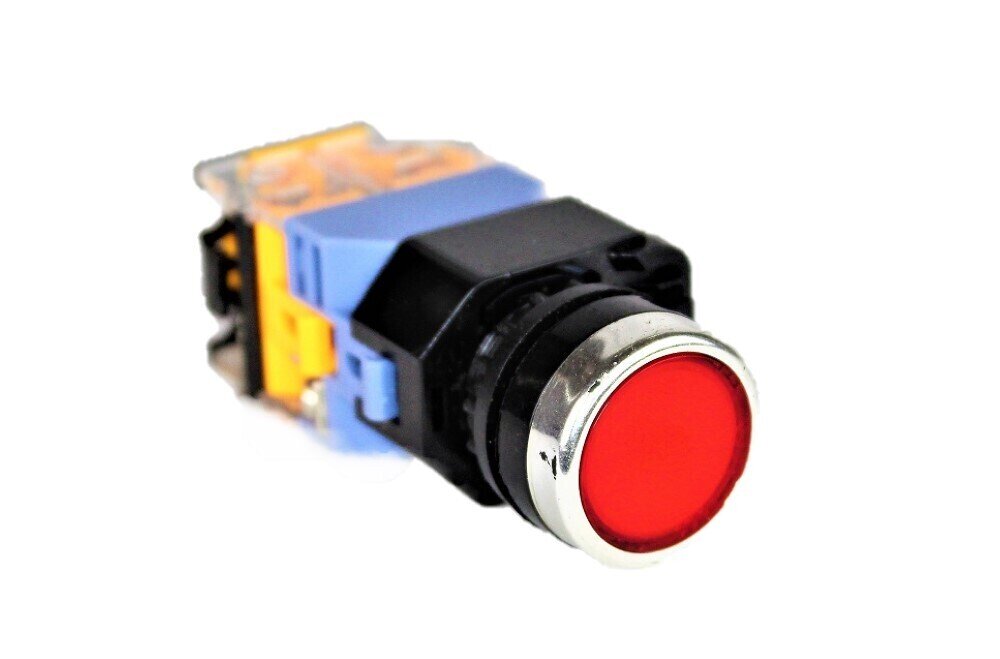
Featuring a round red pushbutton with a silver-tone bezel, the switch provides a clearly identifiable control point for compatible equipment. Its panel-mount design allows it to be installed through a standard 22mm mounting opening.
The photographed assembly includes the front pushbutton actuator, mounting body, and rear electrical contact assembly. Its modular construction is designed for integration into compatible machine control circuits.
This switch may be suitable for replacing an existing machine control button when the mounting dimensions, electrical ratings, contact arrangement, and operating action have been verified.
Important: The switch's momentary or maintained operation, contact configuration, and electrical ratings must be confirmed before installation. A red pushbutton should not automatically be considered an emergency stop switch.
Key Features
- 22mm Panel Mount: Designed for compatible control panels with a 22mm mounting opening.
- Red Pushbutton Actuator: Round red button provides an easily recognizable control point.
- Silver-Tone Bezel: Metallic-looking trim surrounds the pushbutton actuator.
- Panel-Mount Construction: Designed for installation through compatible machine control panels and electrical enclosures.
- Rear Contact Assembly: Includes the attached electrical contact assembly shown in the product photograph.
- Replacement Component: Intended for compatible machinery requiring a matching pushbutton switch assembly.
- Compact Design: Suitable for control panels where mounting space and component dimensions are important.
- Machine Control Application: Can be used in appropriately designed electrical control circuits when its operating characteristics and ratings match the application.
Product Specifications
| Product Type | Panel-Mount Pushbutton Switch |
| Mounting Opening | 22mm |
| Actuator Style | Round Pushbutton |
| Button Color | Red |
| Bezel Appearance | Silver-Tone |
| Housing Color | Black with Colored Rear Assembly |
| Mounting Style | Panel Mount |
| Contact Assembly | Rear-Mounted Contact Assembly |
| Contact Configuration | Not Yet Verified |
| Operating Action | Not Yet Verified – Momentary or Maintained |
| Illumination | Not Yet Verified |
| Electrical Ratings | Confirm from Component Markings |
| Application | Compatible Electrical Control Panels and Machinery |
| Quantity Included | 1 Pushbutton Switch Assembly |
| Rabbit Laser USA SKU | 207 |
Understanding Pushbutton Operation
Pushbutton switches are available with different operating actions and electrical contact configurations. Although two switches may look nearly identical, they may operate differently inside an electrical control circuit.
Momentary Pushbutton: A momentary switch changes its contact state only while the button is pressed. Releasing the button returns the actuator and contacts to their normal positions.
Maintained Pushbutton: A maintained switch holds its operated position or contact state until the button is operated again or released through its designed mechanism.
Electrical contacts may also be configured as normally open (NO), normally closed (NC), or a combination of both.
Important: The operating action and contact configuration of this specific switch have not yet been verified. Confirm these characteristics before using it as a replacement for an existing machine control.
Compatibility
This red pushbutton switch is intended for compatible electrical equipment and control panels requiring a 22mm panel-mounted switch with matching electrical and mechanical characteristics.
Before ordering, compare the replacement switch with your existing component:
- 22mm panel mounting opening
- Front actuator shape and dimensions
- Available clearance behind the control panel
- Momentary or maintained operating action
- Normally open and normally closed contact configuration
- Voltage and current ratings
- Terminal arrangement and connection method
- Illumination requirements, if applicable
- Existing control circuit and machine wiring requirements
Important: A matching 22mm mounting diameter does not guarantee electrical compatibility. Switches with the same appearance may have different contact arrangements, operating actions, and electrical ratings.
This component should only be used with equipment whose electrical and mechanical requirements have been verified.
Installation & Safety
- Turn off and disconnect electrical power before inspecting or replacing the switch.
- Verify that all affected circuits are de-energized before beginning electrical work.
- Confirm that the replacement switch matches the original component's operating action and contact arrangement.
- Inspect the mounting opening and available clearance before installation.
- Secure the switch according to the manufacturer's installation instructions.
- Connect wiring according to the terminal markings and machine's electrical diagram.
- Do not exceed the switch's verified voltage or current ratings.
- Keep wiring away from moving components, sharp edges, and areas where insulation could become damaged.
- After installation, verify correct switch operation and the function of the connected control circuit before returning the equipment to service.
Safety Note: Do not use this general-purpose pushbutton as an emergency stop or safety interlock replacement unless its suitability for that specific safety function has been established.
Electrical switch replacement should be performed by someone qualified to work with the equipment's control circuits. Incorrect wiring or an incompatible switch may cause unexpected machine operation, equipment damage, or electrical hazards.
Rabbit Laser USA supplies replacement switches, electrical components, and control-system parts for CO2 laser machines. If you're unsure whether this 22mm red pushbutton matches your equipment, contact our technical support team with your machine model and clear photographs of the original switch, rear contact assembly, and terminal markings.
Phone: 513-217-5707
Email: support@RabbitLaserUSA.com