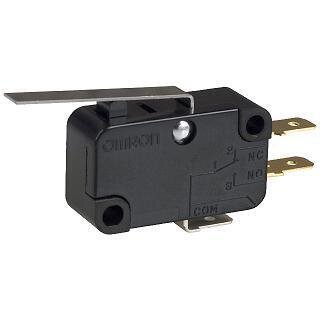
Main Door Safety Micro-Switch – Short Lever, No Roller
LASER PARTS | ELECTRICAL COMPONENTS & SAFETY SWITCHES
Main Door Safety Micro-Switch – Short Lever, No Roller
This Main Door Safety Micro-Switch is a mechanical limit switch designed for compatible CO2 laser engraving and cutting machines. It can be used as part of a machine's door interlock system to detect whether a protective door or access panel is in its intended position.
The switch features a straight metal actuator lever without a roller, a compact rectangular housing, and three electrical terminals marked COM, NC, and NO.
When the machine door moves the lever, the internal electrical contacts change position. In a properly configured interlock circuit, this change allows the machine controller or protection system to detect the door's position and respond according to its wiring and control settings.
Important: The switch alone does not guarantee that a machine will stop operating when its door opens. Correct installation, wiring, mechanical adjustment, and interlock configuration are essential.
Key Features
- Mechanical Door Detection: Uses physical movement of the actuator lever to change the internal contact state.
- Straight Metal Lever: Features a flat actuator arm without a roller tip.
- Three Electrical Terminals: Includes common, normally closed, and normally open connections.
- Compact Housing: Designed for installation in compatible machine enclosures and control mechanisms.
- Mounting Holes: Two mounting holes allow the switch to be secured to a compatible bracket or mounting surface.
- Mechanical Switching: Operates through direct lever movement rather than magnetic detection.
- Replacement Component: Intended for compatible laser machines requiring this style of door-position micro-switch.
Product Specifications
| Product Type | Mechanical Micro-Switch |
| Application | Laser Machine Door Interlock / Position Detection |
| Actuator Style | Straight Metal Lever |
| Roller | None |
| Contact Arrangement | SPDT – Changeover Contacts |
| Terminal Count | 3 |
| Terminal Markings | COM, NC, NO |
| Terminal Style | Flat Blade / Quick-Connect |
| Housing Color | Black |
| Mounting Style | Two-Hole Surface Mount |
| Operation | Mechanical Lever Actuation |
| Quantity Included | 1 Micro-Switch |
| Rabbit Laser USA SKU | 100 |
How the Micro-Switch Works
A mechanical micro-switch contains electrical contacts that change position when its actuator is pressed.
This switch has three terminal positions:
- COM (Common): The shared electrical terminal that switches between the NC and NO contacts.
- NC (Normally Closed): Connected to COM when the switch is in its normal, unactuated position.
- NO (Normally Open): Connected to COM when the actuator is pressed far enough to operate the switch.
When the actuator reaches its switching point, the internal contacts transfer from one position to the other. Releasing the actuator allows the switch to return to its normal state.
In a compatible laser machine, the door or an attached mechanical component presses the lever when the door reaches its intended position.
The electrical control system uses the resulting contact state to monitor the door. The appropriate connection and expected contact state depend on the machine's original wiring and interlock design.
Compatibility
This micro-switch is intended for compatible CO2 laser engraving and cutting machines that use a straight-lever mechanical door switch without a roller.
Before ordering, compare the replacement with your existing switch:
- Switch body dimensions and housing shape
- Mounting hole locations and spacing
- Metal lever length and shape
- Presence or absence of a roller
- Actuator travel and operating position
- Terminal quantity, size, and arrangement
- COM, NC, and NO contact configuration
- Electrical voltage and current ratings
- Existing door mechanism and mounting clearance
Important: Micro-switches that look nearly identical may have different electrical ratings, lever lengths, mounting dimensions, or activation points.
A roller-equipped switch or a different lever style should not be substituted unless the replacement's mechanical operation and electrical compatibility have been confirmed.
Installation & Safety
- Disconnect and isolate the laser machine from its electrical supply before inspecting or replacing the switch.
- Document the original switch's wiring and terminal connections before removing it.
- Verify that the replacement switch has the correct electrical ratings and contact configuration.
- Secure the replacement in its intended mounting position using appropriate hardware.
- Ensure the door mechanism properly actuates the lever without excessive force or mechanical interference.
- Connect the wires according to the machine's original wiring diagram.
- Confirm the switch changes electrical state at the correct point in the door's movement.
- Verify proper interlock operation with the door open and closed before returning the machine to service.
Safety Note: Door interlock switches are part of the machine's protective control system. Never bypass, permanently depress, or defeat a safety switch to allow laser operation with a protective door open.
A switch that clicks when pressed is not necessarily functioning correctly. Electrical continuity and the complete interlock response should be verified.
If a replacement switch does not restore proper interlock operation, inspect the actuator alignment, wiring, connectors, and associated control circuit rather than bypassing the protection system.
Rabbit Laser USA supplies replacement door switches, electrical controls, and other components for CO2 laser engraving and cutting machines. If you're unsure whether this micro-switch matches your equipment, contact our technical support team with your machine model and clear photographs of your existing switch, mounting position, and terminal markings.
Phone: 513-217-5707
Email: support@RabbitLaserUSA.com