Emergency Stop Push Button – 22mm Red Mushroom Head
LASER PARTS | ELECTRICAL COMPONENTS & SAFETY SWITCHES
Emergency Stop Push Button – 22mm Red Mushroom Head
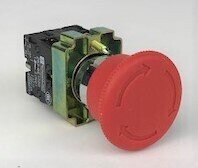
This 22mm Emergency Stop Push Button is a replacement control component for compatible CO2 laser engraving and cutting machines and industrial electrical equipment. Its prominent red mushroom-style head provides an easily accessible control for initiating an emergency stop in a properly designed machine safety circuit.
Designed for installation through a 22mm panel opening, the switch features a red push-button operator and a rear-mounted electrical contact assembly. Its modular construction makes it suitable for replacing an existing emergency-stop control with matching mechanical and electrical specifications.
When properly integrated into a compatible machine's safety control system, pressing the emergency-stop button initiates the machine's intended stopping function. The actual response depends on the connected electrical circuit and machine safety design.
Important: This product must be matched to the original emergency-stop device. Contact arrangement, electrical ratings, reset operation, and safety requirements must be verified before installation.
Key Features
- Red Mushroom-Style Head: Large, recognizable push-button surface designed for emergency-stop applications.
- 22mm Panel Mounting: Designed for installation in compatible 22mm control-panel openings.
- Push-Button Activation: Allows an operator to manually initiate the connected stopping function.
- Rear Contact Assembly: Features an electrical contact-block arrangement for connection to a compatible control circuit.
- Compact Design: Suitable for compatible electrical control panels and machine enclosures.
- Replacement Component: Intended for replacing a matching emergency-stop button in an existing machine safety system.
Product Specifications
| Product Type | Emergency Stop Push Button |
| Operator Style | Mushroom-Head Push Button |
| Button Color | Red |
| Mounting Hole Diameter | 22mm (Approx. 0.87 in.) |
| Mounting Style | Panel Mount |
| Activation | Manual Push Button |
| Electrical Contacts | Rear Contact-Block Assembly; Contact Configuration Must Be Verified |
| Reset Mechanism | Verify Against Original Switch |
| Electrical Ratings | Refer to Contact-Block Markings |
| Application | Compatible Machine Emergency-Stop Control Circuits |
| Quantity Included | 1 Emergency Stop Button Assembly |
| Rabbit Laser USA SKU | 203 |
How an Emergency Stop Button Works
An emergency-stop button is a manually operated control device intended to initiate a stopping function when a hazardous situation occurs.
In many industrial control systems, emergency-stop switches use normally closed (NC) electrical contacts. Pressing the button opens the appropriate control circuit, signaling the machine's safety system to initiate a stop.
However, the specific electrical behavior depends on the switch's contact blocks and how the machine is wired.
Emergency-stop devices commonly use a latching mechanism that holds the button in its activated position until manually reset. Depending on the model, release may require twisting or pulling the operator.
Important: The contact configuration and reset mechanism of this particular assembly must be confirmed before installation. Do not assume that all red mushroom-head switches operate identically.
Resetting an emergency-stop button should not automatically restart the machine. The equipment's control system must require an appropriate separate restart action.
Compatibility
This emergency-stop button is intended for compatible CO2 laser machines and other electrical equipment requiring a matching 22mm panel-mounted emergency-stop control.
Before ordering, compare the replacement assembly with your original component:
- Panel mounting hole diameter
- Operator head size and clearance
- Button activation and reset mechanism
- Normally open and normally closed contact arrangement
- Number and type of contact blocks
- Electrical voltage and current ratings
- Terminal arrangement and wiring requirements
- Mounting depth and available cabinet clearance
- Required safety ratings and equipment specifications
Important: A matching 22mm mounting hole does not guarantee electrical or safety compatibility. Emergency-stop switches can have different contact configurations, reset mechanisms, ratings, and certification requirements.
The replacement must meet the machine manufacturer's electrical and safety-control requirements.
Installation & Safety
- Disconnect and isolate the laser machine from its electrical supply before inspecting or replacing the emergency-stop switch.
- Verify that all relevant electrical circuits are de-energized before beginning installation.
- Confirm that the mounting opening and available panel clearance match the replacement assembly.
- Compare the replacement's electrical contact configuration and ratings with the original switch.
- Install the switch securely according to its manufacturer's mounting instructions.
- Connect the electrical contacts according to the machine's approved wiring diagram.
- Verify that the button activates, remains in the required stop state, and resets correctly.
- Test the complete emergency-stop function before returning the machine to service.
- Confirm that resetting the button does not cause an unexpected machine restart.
Safety Note: Emergency-stop controls are part of a machine's overall safety system. An incorrectly wired or unsuitable switch may prevent the machine from stopping when required.
Emergency-stop switches do not replace protective enclosures, door interlocks, electrical isolation procedures, or other required machine safeguards.
Installation and testing should be performed by someone qualified to work on machine electrical and safety-control systems. Never bypass or disable an emergency-stop circuit to restore machine operation.
Rabbit Laser USA supplies replacement electrical switches, emergency-stop components, and control parts for CO2 laser machines. If you're unsure whether this switch matches your equipment, contact our technical support team with your machine model and clear photographs of the original button, contact blocks, and electrical markings.
Phone: 513-217-5707
Email: support@RabbitLaserUSA.com